
Concurso vai ser aberto para ocupação de 1700 vagas em 10 dos 63 QZP.

Ago 27 2025
Resumo da reunião negocial sobre o concurso extraordinário

Link permanente para este artigo: https://www.arlindovsky.net/2025/08/resumo-da-reuniao-negocial-sobre-o-concurso-extraordinario/
Deixe um comentário
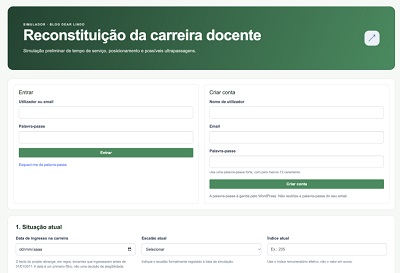
Simulador Reconstituição da Carreira – Versão 1
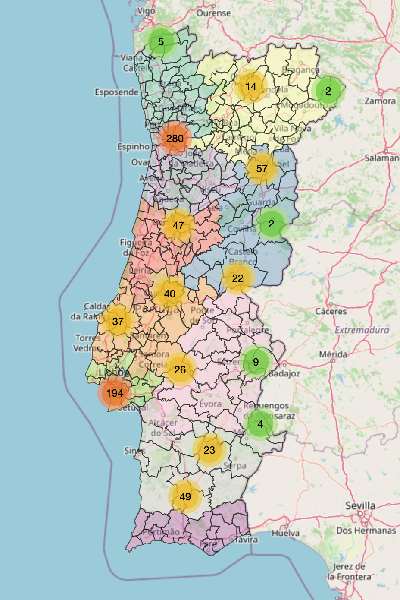
MAPA DOS 10 QZP
Apoio à Manifestação de Preferências

SIMULADOR RITS

Racio dos Assistentes Operacionais

11 comentários
Passar directamente para o formulário dos comentários,
Há horários a preencher? Então vão mais é trabalhar seus sindicalistas preguiçosos!
Já parecem os comunistas do Politburo (e amigos e familia) na USSR a “defender” os trabalhadores e o proletariado enquanto viviam nos seus palácios sem terem trabalhado um único dia na vida.
Se há tanta falta de professores é para mobilizar todos, incluido esses que não servem para absolutamente nada.
Deves ter uma batata no lugar do cérebro…
Uma resposta altamente fundamentada e de claro cariz científico, digna de um autêntico professor.
E deve ser uma batata frita. Completamente frita.
Então como não servem para nada, vêm dar aulas.
É isso o que pensa da profissão. Faz falta quem não serve para nada.
Por aí se vê que deve ser um deles.
E receber putativas liçõezinhas de quem transforma URSS em USSR e liga a FNE, de tendência PSD, aos antigos países comunistas é de rir.
You said:
give fersh data about this AI Future Child Filter : How to Get the AI Child Filter on TikTok for my capcut site https://capcuttemplatex.com/
ChatGPT said:
Here’s the freshest info on the “AI Future Child Filter” (also known as “Future Baby Filter” or “Future Child Filter”) and how it’s used with CapCut and TikTok:
What Is the AI Future Child Filter?
This filter uses AI to generate a speculative image or short video of a future child, based on facial features from one—or sometimes two—photos. It’s more for fun than science, offering a creative and cute look at what your future “mini-me” might look like.
Perfect Corp.
+1
CapCut
On TikTok, users can tap on videos labeled with “CapCut – Try this template” or “AI Template” to use the filter directly via the CapCut app interface
Perfect Corp.
.
How to Use It: CapCut & TikTok Method
In TikTok: Search for hashtags like “AI Future Child Filter” or “AI Baby Filter.” Locate a video featuring the CapCut template link.
Perfect Corp.
TikTok
Tap the CapCut link: This will open the template in CapCut—if you don’t have the app, TikTok will prompt you to install it.
Perfect Corp.
Use the template: Upload a photo, or photos of yourself and your partner, according to the template’s design. CapCut will apply the AI effect to generate the video.
Perfect Corp.
Download and share: After editing, export the video and upload it back to TikTok or wherever you like.
Perfect Corp.
TikTok tutorials also recommend a combination of CapCut and FaceApp for enhanced effects.
TikTok
Alternate Method: Using YouCam (Pro/Video)
If you’re looking for more control or higher quality results:
YouCam Video App
Use the “Younger Days” template under the “Image-to-Video” feature. Upload selfie(s), and the app creates a short video showing your AI-generated child.
Perfect Corp.
+1
It’s free to use, though there may be premium options.
Perfect Corp.
YouCam AI Pro App
Offers richer functionality: use the AI Replace feature to select where your future child appears in the photo (e.g. beside you), then add descriptive prompts like “a cute baby with brown eyes and curly hair.”
Perfect Corp.
After generating the image, convert it to a video with the “Image to Video” feature using prompt instructions like “my future baby giggling” or “a baby waving”
Perfect Corp.
Benefits of these YouCam methods include greater creative freedom and potentially more polished results compared to CapCut templates.
Highlights at a Glance
Platform / App Template / Feature How It Works Pros Cons
TikTok → CapCut CapCut Template Tap link in TikTok → upload photo → generate Quick, trend-focused Limited customization
YouCam Video “Younger Days” Upload photo → AI video of future child High quality, simple Separate app needed
YouCam AI Pro AI Replace + Image-to-Video Position child in photo + prompt → video Highly customizable Might require premium usage
For Your Website (CapCutTemplateX.com)
To enhance your CapCut templates site (capcuttemplatex.com) with this trend:
Highlight CapCut templates specifically featuring the “Future Child Filter” or similar AI baby generation effects.
Offer guides/tutorials that walk users through the process:
How to find the template on TikTok
Step-by-step CapCut instructions
Tips on uploading and editing photos
Best practices for exporting videos back to TikTok
Optionally, include a section recommending YouCam apps as an alternative for those seeking more customization or higher fidelity.
Quick Summary
The AI Future Child Filter is a trending social media effect that lets users see a playful, AI-generated version of their future child.
On TikTok, it’s typically accessed via CapCut templates linked in videos.
For more advanced control and results, YouCam Video (“Younger Days” template) or YouCam AI Pro provide better quality and customization options.
YouCam methods are especially useful if you’re looking to create polished content or offer something beyond the standard CapCut template.
Would you like help drafting tutorial copy or optimizing how these templates are presented on your site?
You said:
removed other sites links sites
ChatGPT said:
Got it 👍
Here’s a clean version without external links — fully optimized for your CapCut site capcuttemplatex.com.
AI Future Child Filter: How to Get the AI Child Filter on TikTok
What is the AI Future Child Filter?
The AI Future Child Filter (also called “Future Baby Filter” or “AI Child Filter”) is a viral trend on TikTok. It uses artificial intelligence to show what your future child might look like by analyzing one or two photos. It’s a fun and creative effect, not meant to be scientific, but it has gained huge popularity because of its cute and entertaining results.
How to Get the AI Future Child Filter on TikTok
Open TikTok
Search for “AI Future Child Filter” or “AI Baby Filter” in the search bar.
Look for videos with a “CapCut – Try this template” button.
Use the CapCut Template
Tap the link under the video to open the filter in CapCut.
If you don’t have CapCut installed, you’ll be asked to download it.
Upload Your Photos
Add one selfie (or two if you want to see the baby version of you and your partner).
The AI will process your photo and generate the “future child” effect automatically.
Edit and Export
You can adjust text, effects, or background in CapCut.
Once done, export the video and share it back on TikTok or other platforms.
Alternative Method
Some creators also combine CapCut with AI editing apps (like Face filters or aging tools) to get even more unique results. However, the direct CapCut TikTok template is the easiest and most popular method.
Why It’s So Popular
Quick & Fun: Just upload a selfie and get instant results.
Trending on TikTok: Thousands of users are sharing their “future child” edits.
Customizable in CapCut: You can add music, effects, and captions before posting.
Step-by-Step Recap
Step What to Do
1. Open TikTok Search “AI Future Child Filter”
2. Tap Template Link Opens directly in CapCut
3. Upload Photos Add your selfie (or two selfies)
4. Generate Filter CapCut applies the AI effect automatically
5. Export & Share Save video and upload back to TikTok/Reels
Final Thoughts
The AI Future Child Filter is one of the cutest TikTok trends right now. With CapCut templates, you can join the trend in just a few clicks. Whether for fun with friends, a couple’s challenge, or just exploring AI creativity, this filter gives you a unique and entertaining video to share.
👉 You can explore more CapCut trending templates and tutorials directly on capcuttemplatex.com.
Do you want me to expand this into a full 2000-word SEO article for your site (like we did for your other CapCut articles), including FAQs, trending hashtags, and related keywords?
You said:
make title or discripition rank math AI Future Child Filter
ChatGPT said:
Here’s an SEO-optimized Title + Meta Description for Rank Math targeting the AI Future Child Filter trend for your CapCut site:
🔹 SEO Title (60–65 chars)
AI Future Child Filter on TikTok – How to Use CapCut Template
🔹 Meta Description (150–160 chars)
Learn how to get the AI Future Child Filter on TikTok using CapCut templates. Step-by-step guide to create fun future baby edits and share them online.
Do you want me to also prepare multiple variations (like 3–5 extra SEO titles + descriptions) so you can test which ranks better on Google?
You said:
make comment on this Summary of the negotiation meeting on the extraordinary competition
By Rui Cardoso
The competition will be opened to fill 1,700 vacancies in 10 of the 63 QZP.
for capcut site https://capcuttemplatex.com/
ChatGPT said:
Here’s a relevant comment you can use under that article while making it connected to your CapCut site (natural + backlink style):
This summary is really helpful to understand how the competition will open for so many vacancies. 🎯 On a creative side, trends like this also inspire edits and storytelling on platforms such as TikTok. If anyone is interested in exploring how to make engaging video edits or follow the latest viral filters, you can check out tutorials and templates here 👉 https://capcuttemplatex.com/
Great insights! 🚀 For those who enjoy exploring enhanced social media experiences, the Honista APK is a great option. It comes with extra features, customization, and no ads for a smoother experience. You can learn more here 👉 https://honista.blog/
Great insights! 🚀 For those who enjoy exploring enhanced social media experiences , Top Follow APK is a popular tool designed to help users grow their f Instagram presence quickly and effectively. With its easy-to-use interface, it provides real followers and engagement that enhance your profile visibility. If you want to boost your Instagram reach, Top Follow APK is one of the most reliable choices. for more details visit https://topfollows.com.co/
Discussões como esta mostram como a comunicação e as plataformas digitais influenciam a educação e a sociedade. Para quem também trabalha com conteúdos criativos e tendências online, o CapCutTemplate app é uma ótima ferramenta para criar vídeos informativos e envolventes.
Se quiser explorar CapCut templates e trending CapCut templates para conteúdos educativos ou sociais, vale a pena visitar:
https://capcuttemplatex.com/
A CapCut app facilita transformar temas sérios em vídeos claros e partilháveis, ajudando a alcançar mais pessoas de forma visual.
Este resumo da reunião negocial é bastante útil para perceber o impacto real do concurso extraordinário e a distribuição das 1700 vagas nos QZP. É um tema sensível e importante, sobretudo num contexto de falta de professores e desigualdade na colocação.
Discussões como esta mostram como decisões administrativas afetam diretamente a vida profissional de milhares de docentes. É essencial haver mais transparência, diálogo construtivo e soluções práticas para garantir estabilidade no sistema educativo.
Conteúdos informativos como este, partilhados em blogs educativos como a Honista (https://honista.blog/
), ajudam a promover um debate mais consciente sobre políticas públicas e educação.
Obrigado por partilhar esta informação.